

Buddy for screenshots and photos
Send me a screenshot of the error or a photo of the letter. I’ll tell you what it means in plain words and what to do next.
A retired machinist in Marquette, Michigan, with a church bulletin to print and a pop-up he’s never seen.
Buddy made the photos of the screen and the letter in this conversation to stand in for the ones a person would send.
Send me a screenshot or a photo of the page. I’ll tell you what it says and what to do next, one step at a time.
- This popped up saying my computer has a virus. Is it real?
- Here’s a letter from the county. What are they asking me to do?
- Here’s a receipt from the hardware store. List what I bought and what each thing cost.
- Today 10:05 AM
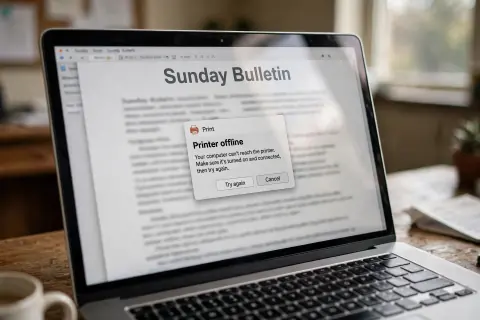
- You sent a picture: A phone photo of a laptop screen at a church office desk: the Sunday Bulletin with a Print window in front of it saying the printer is offline, with Try again and Cancel buttons
- You: what does this mean and what do I click? I need the church bulletin printed by noon
- Buddy: It means your computer can’t reach the printer right now. Nothing is wrong with the computer.
- Buddy: Turn the printer off, wait ten seconds, and turn it back on. When its light stops blinking, click Try again.
- You: that did it. it’s printing
- 10:12 AM
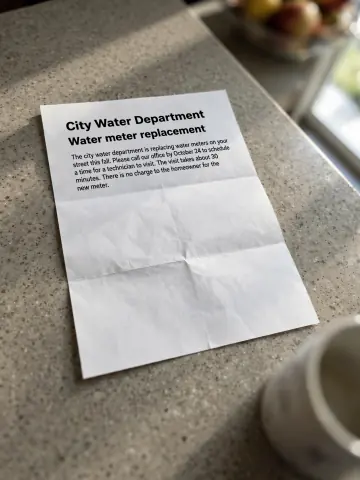
- You sent a picture: A photo of a one-page letter from the City Water Department about water meter replacement, on a kitchen counter
- You: one more. this came yesterday. do I have to do something?
- Buddy: Yes, one thing. They’re replacing water meters on your street and want you to call by October 24 to pick a time. Nothing to pay.
- You: ok I’ll call monday Buddy liked this.
Send me a screenshot of the error or a photo of the letter. I’ll tell you what it means in plain words and what to do next.
From a confusing screen to the next step
Send me the picture
A screenshot of the whole message, or a photo of the whole page. Tell me what you were trying to do when it showed up.
I read it and explain
What it says in plain words and what it’s asking of you. If part of it is hard to read, I’ll say which part.
Do the next step
I tell you what to click or who to call, in order. If it didn’t work, send a picture of what you see now.
More you can ask for
- What does this error message mean, and what do I click?
- Here’s a photo of a parking ticket. When is it due, and where do I pay it?
- This is the settings screen on my new TV. How do I turn the captions on?
- This form came home from school. Which parts do I fill out?
- Here are photos of a three-page letter. Give me the short version.
- Turn these five receipts into a spreadsheet with a total.
What you get back
What it means, in plain words
What the error or the letter says without the jargon, and whether it’s asking anything of you.
What to do next
The steps in order, like what to click or who to call and by when. Tell me how it went and I’ll take it from there.
The part I couldn’t read
If a corner is blurry or cut off, I’ll say which part, so you can send a clearer copy.
Work with filesA list you can keep
Ask and I’ll turn a receipt or a stack of them into a spreadsheet, or a letter into a one-page summary.
Working with data
What the letter asks for
The city water department is replacing water meters on your street this fall.
What it’s about: a new meter at your house.Please call our office by October 24 to schedule a time for a technician to visit. The visit takes about 30 minutes.
The one thing to do: call and pick a time.There is no charge to the homeowner for the new meter.
Nothing to pay.
Questions people ask
What can I send him?
A screenshot, a photo of a letter, a form, or a receipt, or a file like a PDF or a Word document. If a page is hard to read, Buddy says which part and may ask for a clearer copy.
Can he click it for me?
Buddy works from your picture and tells you what to click. You do the clicking on your own computer, then tell him what happened.
Is he a lawyer or a tax advisor?
No. Buddy isn’t a lawyer, doctor, or tax advisor. He reads a letter and says what it’s asking for in plain words. For a legal, medical, or tax decision, take his summary to someone who is.
What if his fix doesn’t work?
Send a new screenshot of what the screen shows now. Buddy works from what’s in front of you, so a fresh picture helps more than a description.