

Buddy for proposals
Send me your notes, your numbers, and who it’s for. I’ll write the proposal and send back a file you can look over before it goes anywhere.
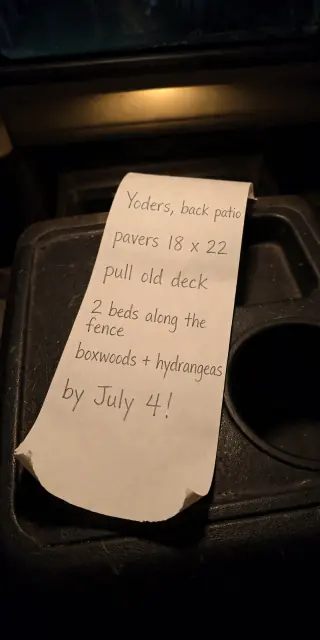
A landscaper in Lancaster, Pennsylvania, with site notes on the back of a feed-store receipt.
Buddy made the photo of the receipt in this conversation to stand in for the one a person would send.
Send me your notes, your numbers, and who it’s for. I’ll send back a file you can review before it goes anywhere.
- Make it a Word file so I can edit it.
- Here’s last year’s proposal. Use the same layout for the Kim job.
- Email the PDF to me so I can send it from my own account.
- Today 8:55 PM
- You sent a picture: A photo of site notes in pencil on the back of a long feed-store receipt, on a truck console at night
- You: turn these notes into a one-page proposal I can send. Yoders, back patio. pavers 18x22, pull the old deck, 2 beds along the fence, boxwoods and hydrangeas. they want it by july 4
- Buddy: Got it. What are your prices, or should I leave the numbers blank?
- You: patio 8,400 installed, beds 2,100. half down to start
- Buddy: Writing it now 🌿
- 9:04 PM
- Buddy: Here it is: scope, price, timeline, and a line for their signature, all on one page.
- Yoder Patio ProposalPDF, one page
- Buddy: I wrote July 4 as a goal, not a promise, since rain could push it. Change that if you’d rather commit.
- You: perfect. sending it in the morning Buddy loved this.
Send me your notes, your numbers, and who it’s for. I’ll write the proposal and send back a file you can look over before it goes anywhere.
From rough notes to a proposal
Send me the notes
Type them, paste them, or attach a file. Add your prices and terms, or tell me to leave the numbers blank.
I write it
Scope, price, timeline, and terms, in the format you want. Say what to change and I’ll make another version.
You send it
I send the file to you. Sending it to a client from your email needs a connected app and your say-so, so you can review it first.
More you can ask for
- Turn these notes into a one-page proposal I can send.
- Use this photo of the Kims’ yard to show them what the finished patio could look like.
- Translate the proposal into Spanish for the Morales family.
- Read this proposal and tell me what’s unclear before I send it.
- Look up what paver patios usually cost around here so I can check my price.
- Make a short slide deck from this proposal for Thursday’s meeting.
What you get back
A file you can send
A Word document or PDF, laid out the way you asked. Open it, download it, and send it yourself.
Work with filesVersions until it’s right
Ask for a shorter version, a different tone, or new numbers. You don’t have to start over.
A spreadsheet behind the numbers
If the price has parts, ask for a spreadsheet with the line items and the total.
Working with dataA draft you can edit together
In the VXBE desktop app, I can make a document we both edit. Choose Save when you’re done with your changes.
Back patio for the Yoders
- Pull the old deck, lay an 18x22 paver patio
- Two beds along the fence, boxwoods and hydrangeas
- Patio, installed: $8,400
- Beds: $2,100
- Total $10,500, half down to start
- Goal: done by July 4, weather permitting
- Accepted by
- Date
Questions people ask
Will Buddy send the proposal to my client?
Not unless you ask. He sends the file to you. Sending it to someone else needs a connected email app and the exact recipient you want.
Can he fill in the prices?
Give Buddy your prices and he’ll use them. If one is missing, he can ask or leave it blank. He can look up public prices to compare, but the number you quote is yours to decide.
Can I use my own template?
Yes. Send a past proposal or a file you like, and say what should stay the same.