

Hi, I’m Buddy.
I’m who you text when something needs doing. Tell me like you’d tell a friend, and I’ll handle it and check back in.
I look things up, make files and pictures, work through websites, come back to things later, and work right in the apps you use.
Text me, email me, or open the VXBE desktop app.
Tell me once. I’ll plan around it, and I’ll text you when it’s time.
- What do you remember about the move?
- What do you know about how I like to work?
- Why do you think that? What did I tell you before?
- Sunday 4:12 PM
- You: fyi i’m vegetarian now, as of today 🥕
- Buddy: Noted, and it's in my notes as of today so food suggestions, recipes, and grocery lists will come to you vegetarian from here on.
One thing that would help me get it right in practice: are dairy and eggs still in for you, or is it fully plant-based? - Yesterday 8:14 PM
- You: need an easy dinner for 6 on friday, nothing fancy. just send me the grocery list
- Buddy: Friday's dinner is sweet potato and black bean tacos, meat-free, and it feeds 6 with a little extra.
Produce
• 4 large sweet potatoes (about 3 lb)
• 1 small head red cabbage
• 2 red onions
• 1 head garlic
• 1 bunch cilantro
• 4 to 5 limes
• 3 to 4 ripe avocados
• 1 or 2 jalapeños
Cans and frozen
• 4 cans black beans (15 oz)
• 1 bag frozen corn (16 oz), or 4 ears if you'd rather cut it off the cob
Bakery and dairy
• 24 to 30 corn tortillas
• Optional: crumbled cotija or feta, sour cream or plain yogurt
Pantry, only if you're out
• Ground cumin
• Chili powder
• Smoked paprika
• Olive oil
• Salt
• Hot sauce
Cube the sweet potatoes, toss with oil, cumin, chili powder, paprika, and salt, and roast at 425°F for about 25 minutes. Warm the drained beans with garlic and cumin, shred the cabbage with lime juice and salt, warm the tortillas in a dry pan, and set it all out. About 35 minutes, mostly hands-off.
Nothing on the list has meat or eggs in it, so the dairy items are the only call you have to make. - You: perfect. remind me thursday at 6:30am to go shopping
- Buddy: Set for Thursday at 6:30 AM. The reminder will arrive with the whole grocery list in it, so you can shop straight from that message without digging back through this thread.
It's a one-time reminder, so nothing keeps running after Thursday. - Today 6:30 AM
- Buddy: Shopping now for Friday's dinner for 6. Vegetarian list:
Produce
• 4 large sweet potatoes (about 3 lb)
• 1 small head red cabbage
• 2 red onions
• 1 head garlic
• 1 bunch cilantro
• 4 to 5 limes
• 3 to 4 ripe avocados
• 1 or 2 jalapenos
Cans and frozen
• 4 cans black beans (15 oz)
• 1 bag frozen corn (16 oz), or 4 ears
Bakery and dairy
• 24 to 30 corn tortillas
• Optional: cotija or feta, sour cream or plain yogurt
Pantry, only if out
• Ground cumin
• Chili powder
• Smoked paprika
• Olive oil
• Salt
• Hot sauce
What you can hand me.
No special words, no setup. Here’s the kind of work I take on, with a guide for each.
I look into it and line it up.
Compare the three gyms closest to my work on monthly price, hours, and sign-up fees.
How research worksI make the file you need.
Make a sign-up sheet for the bake sale as a PDF I can print. We need people for setup, three baking slots, and cleanup.
Word documents, PDFs, spreadsheets, and slide decks.
How files work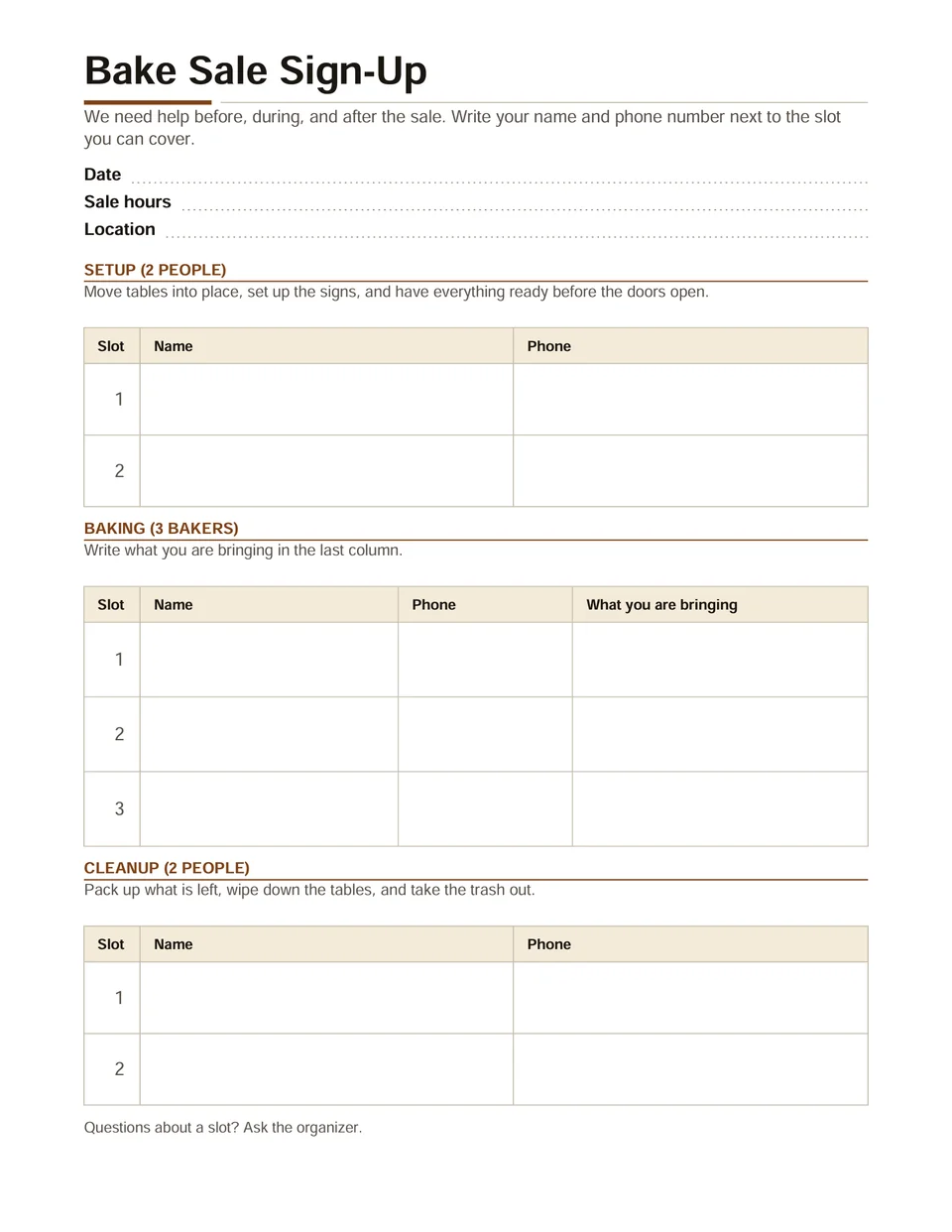
Made by Buddy from this ask, after one round of changes. I make pictures.
Make a cheerful painted flyer for our block party, with room at the top for the date.
How pictures and video work
Made by Buddy from this ask. I build pages you can share.
Make a page for Saturday’s hike so I can text it to the group: we meet at 8 at the Lookout Road trailhead lot, it’s about 5 miles, bring water, layers, and a snack.
Anyone with the link can open it. It stays up 72 hours unless you ask me to keep it live.
How shared pages work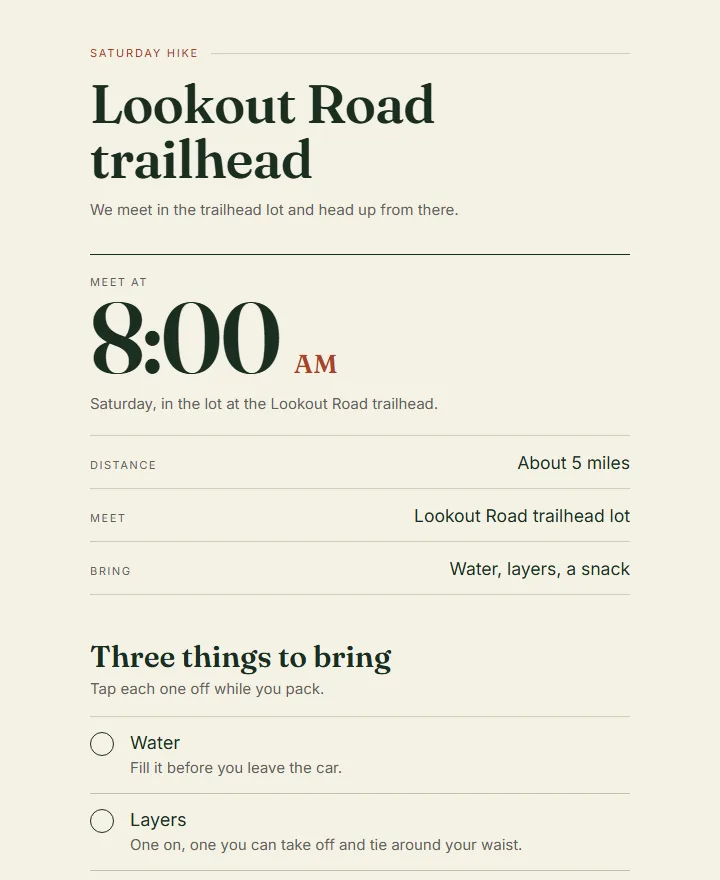
Made by Buddy from this ask. The top of the page he sent back. I work through websites.
Find the library’s study room page and fill in Thursday at 4, ready for me to look over before it’s booked.
How I use websitesI come back to it later.
In three weeks, ask me if the rebate check came. If it didn’t, find the number to call.
How reminders and repeat work goI read what you send.
electric-bills-2025.csvHere’s our electric bill history for the year. Which months cost the most?
Photos, files, spreadsheets, and voice memos up to ten minutes.
How I work with what you sendI learn how you like things done.
When you write our HOA newsletter, put dates first, then repairs, then anything that needs a vote.
How I learn your way of doing things
Want to watch a whole job, from the first text to what came back? See ways to use Buddy
I work in the apps you already use.
Connect the ones you use and I’ll work right in them. Ask me to connect one and I’ll send you the link. You finish the sign-in yourself.
 Gmail
Gmail Google Docs
 HubSpot
 Aircall
 AWS Marketplace
 Box
Box Contentful
 Discord Bot
 Excel
Excel FreshBooks
 Google Analytics
 Google Tasks
 Hacker News
 Jira
Jira Mercury
 Moneybird
 OpenWeatherMap
 Prisma
 Seat Geek
 Splitwise
 Ticketmaster
 Typeform
 Wrike
Wrike Zeplin
 Zoho Inventory
 Google Calendar
 Dropbox
 Airtable
 Aiwyn Tax
 Basecamp
 Cal
Cal Dart
Dart Dub
Dub Exist
Exist GitLab
 Google BigQuery
 Gorgias
 Harvest
 Kit
Kit Mermaid Chart
 MoSPI
MoSPI OSV
OSV Pushbullet
 Sentry
 Square
 Ticktick
 Viator
 Yandex
 ZipRecruiter
 Zoho Invoice
 Notion
 Canva
Canva Todoist
 AllTrails
 Bench
Bench Capsule CRM
 DeepWiki
 Dynamics 365
 Facebook
 GLEIF API
 Google Classroom
 Granola
 Honeycomb
 LinkedIn
 Microsoft Teams
 Mural
Mural PagerDuty
 QuickBooks
 Servicem8
 Stack Exchange
 Timely
 WakaTime
 Yelp
Yelp Zoho
Zoho Zoho Mail
 Outlook
 Trello
 Calendly
 Apaleo
 Bitbucket
 Clarity AI
 Dialpad
 Entelligence
 Fathom
 GoDaddy
 Google Meet
 Granted
 Inspo
Inspo Linkhut
 Miro
Miro NotebookLM
 Pinterest
 Reddit
 SharePoint
 Stripe
 TinyFish
 Webex
Webex YNAB
YNAB Zoho Bigin
 Google Drive
 Asana
Asana Linear
 Apify
Apify Blackbaud
 ClickUp
 Dice
Dice Eventbrite
 Figma
Figma Gong
Gong Google Search Console
 Greenhouse
 Instagram
 Mailchimp
 Mobbin
 Omnisend
 Pinterest Ads
 Reddit Ads
 Shippo
 Supabase
 Trivago
 WhatsApp
 YouTube
 Zoho Books
 Google Sheets
 Zoom
Zoom GitHub
 Attio
Attio Boldsign
 Confluence
 Discord
 Excalidraw
 Freeagent
 Google Ads
 Google Slides
 Gumroad
 Intercom
 Malwarebytes
 Monday
 OneDrive
 PopHIVE
 Roam
Roam SlidesGPT
 Taskrabbit
 Twitch
 Wix
Wix Zendesk
 Zoho Desk
No app for it? I use the website.
I follow links, compare pages, download what you need, and fill in forms. When a site wants your password or card, you type it in on the site yourself.
How I use websitesAnd I have my own computer.
I run programs, work through an app’s menus and buttons, and pull several files into one result. Yours can stay off.
How my computer worksConnecting an app
Open your account’s app list, or just ask me. You see what each app is asking for before you connect it.
How connecting apps works
Three ways to reach me.
Same Buddy in all of them.
Text me
In iMessage, from the phone you already carry. Photos, voice memos, and links all work.
Email me
Write to me from the email address on your account, so I know it’s you. Forward anything, and reply to keep going.
Open the VXBE desktop app
For Windows. Watch me work, take over when I need you, and find everything I’ve saved for you. Completely optional.
Hand me the first thing on your list.
Buddy is a personal AI made by VXBE.
Your first week with me is $1.